Barcode label printing for small business inventory is not the most exciting topic in the world, but neither is losing track of products, mixing up SKUs, or realizing the wrong item shipped because two boxes looked “basically the same.”
Inventory systems only work if the labels work.
A barcode label connects the physical product to the business system behind it. That might be a spreadsheet, POS system, Shopify store, warehouse tool, wholesale catalog, or retail scanner. Without clear labels, inventory becomes guesswork. Guesswork is fine for choosing a parking spot. It is less charming when customer orders are involved.
Printing Ray has covered the basics in its article on barcode labels for small business owners, and the practical takeaway is simple: good labels make products easier to track, sell, and reorder.
Why Small Businesses Need Barcode Labels
Small businesses often start with manual inventory.
That works for a while. Then the product line grows. More SKUs get added. Wholesale orders come in. Retail shelves need labels. Online orders need to match physical stock. Staff members need to find products quickly.
At that point, handwritten labels and memory are not enough.
Barcode labels can help with:
- Inventory tracking
- Product identification
- Retail checkout
- Warehouse picking
- Order accuracy
- Reordering
- Batch tracking
- SKU management
- Wholesale fulfillment
- Product organization
A barcode label does not make the entire inventory system perfect. But it gives the system something reliable to scan.
That is a good start.
Decide What the Barcode Needs to Do
Not every barcode label has the same purpose.
Some labels are for internal inventory. Some are for retail checkout. Some are for warehouse tracking. Some are for wholesale cartons. Some are for product packaging.
Before printing labels, decide what information needs to be included.
A barcode label might show:
- Barcode
- SKU
- Product name
- Variant
- Color
- Size
- Price
- Batch number
- Expiration date
- Location code
- QR code
- Company name
Do not include more than needed. A tiny label overloaded with text becomes hard to read and harder to use.
The barcode should be the priority if scanning is the main job.
Choose the Right Barcode Type
Barcode type depends on how the label will be used.
Retail products may need UPC barcodes. Internal inventory may use Code 128 or another format. QR codes may be useful for product pages, instructions, or batch information, but they are not always a replacement for traditional barcodes.
If you sell through retailers, check their requirements before printing. Retail systems can be picky, and “close enough” is not a barcode strategy.
For internal inventory, you have more flexibility. Just make sure your scanner or app can read the barcode format you choose.
Test before printing a large batch. This sentence is boring because it is important.
Make Labels Easy to Scan
A barcode label should scan quickly.
That means:
- High contrast
- Clean print quality
- Enough white space
- Correct barcode size
- No distortion
- Flat placement
- No glossy glare problems
- No wrinkles
- No text crowding the code
Barcodes need quiet zones, which are the blank spaces around the code. If you crowd the barcode with borders, graphics, or text, scanning can become unreliable.
A barcode is not a decorative stripe pattern. It has needs.
Respect the needs.
Pick Material Based on Use
Barcode labels can be printed on different materials depending on where they will go.
For indoor boxes or shelves, paper labels may be enough. For products exposed to moisture, handling, refrigeration, or outdoor conditions, a more durable material may be needed.
Think about:
- Shelf storage
- Product packaging
- Refrigeration
- Freezers
- Moisture
- Oils
- Shipping
- Handling
- Curved surfaces
- Long-term use
If the label will be scanned repeatedly, durability matters more. A damaged barcode is not just ugly. It can stop the workflow.
For broader print-product planning, Printiverse is a useful resource for thinking about custom printed items across cards, stickers, labels, and other business materials.
Use Roll Labels for Higher Volume
If you need a lot of barcode labels, roll labels are usually easier to handle.
Roll labels work well for:
- Product packaging
- Warehouse labeling
- Retail items
- Batch labeling
- Shipping prep
- Repeated application
- Staff workflows
Sheets can work for smaller batches or office printing. Rolls are better when speed and consistency matter.
If staff are applying labels all day, the label format matters. A roll can save time and keep the process cleaner.
Nobody wants to peel 800 tiny labels from loose sheets while questioning their career choices.
Keep Human-Readable Text
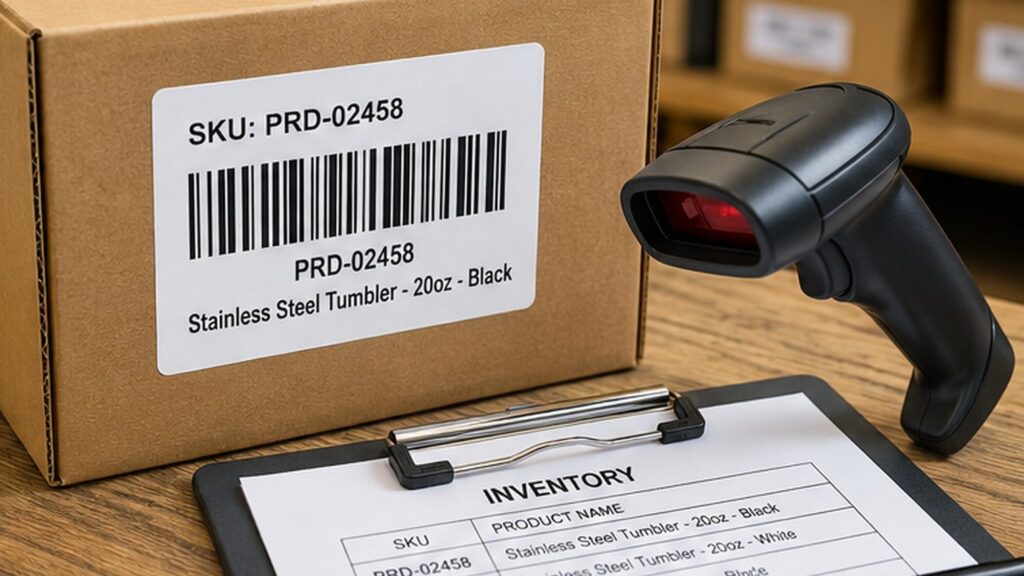
A barcode should have human-readable information too.
If the barcode does not scan, staff should still be able to identify the product.
Include at least:
- SKU
- Product name or short name
- Variant, if needed
For example:
SKU: CNDL-LAV-8OZ
Lavender Candle 8 oz
This helps during scanner issues, manual counts, and order checks.
A barcode-only label may look clean, but it gives humans nothing to work with when technology decides to be dramatic.
Test Labels Before Full Production
Before printing a large batch, test labels in real conditions.
Check:
- Does the barcode scan?
- Does it scan from the expected distance?
- Does it scan on the actual product?
- Does the label fit the surface?
- Does it stay attached?
- Does it smear?
- Does it wrinkle?
- Is the text readable?
- Does the scanner read every label consistently?
Test with the scanner, app, or POS system you actually use. A barcode that scans on one phone app may not behave the same in your retail or warehouse setup.
The real workflow is the test.
Build a Consistent Label System
Barcode labels work best when they are part of a system.
Use consistent:
- SKU format
- Label size
- Barcode placement
- Text placement
- Variant naming
- Product categories
- Batch codes
- Reorder process
A consistent system makes it easier for staff to learn and easier for the business to grow.
Small businesses often delay systems because they feel too formal. Then growth happens, and suddenly everyone is trying to decode old product names like ancient ruins.
Start clean early. Future you deserves at least one favor.
Final Thoughts
Barcode label printing for small business inventory is about accuracy, speed, and organization.
Decide what the label needs to do. Choose the right barcode type. Make it easy to scan. Pick material based on the product environment. Use roll labels for higher volume. Keep human-readable text. Test everything before printing a large batch.
A barcode label is not glamorous, but it can quietly prevent a lot of business headaches.
That is a respectable job for a small printed label.